
Note
Go to the end to download the full example code.
Markers with Instanced Rendering#
Compare instanced and GL_POINTS rendering methods for Markers visual.
This example shows how instanced rendering works around platform point size limits (many platforms limit GL_POINTS to 64px or smaller) and demonstrates the canvas_size_limits feature for constraining marker sizes during zoom/pan.
Controls: * m: Toggle between ‘points’ and ‘instanced’ rendering methods * s: Cycle through marker sizes * c: Toggle canvas size clamping (min 10px, max 100px) * z: Toggle scaling mode: ‘fixed’ vs ‘scene’ (grows/shrinks with zoom) * l: Toggle spherical lighting (3D sphere effect) * k: Cycle through marker shapes (disc, arrow, ring, etc.)
Notes:
you may not see a difference between methods on your platform - that’s fine!
‘instanced’ method should be the same across platforms (arbitrarily large markers)
Canvas size clamping keeps markers readable during zoom
Spherical lighting adds depth to markers with simulated 3D lighting
There may be lighting direction differences between methods (known issue)
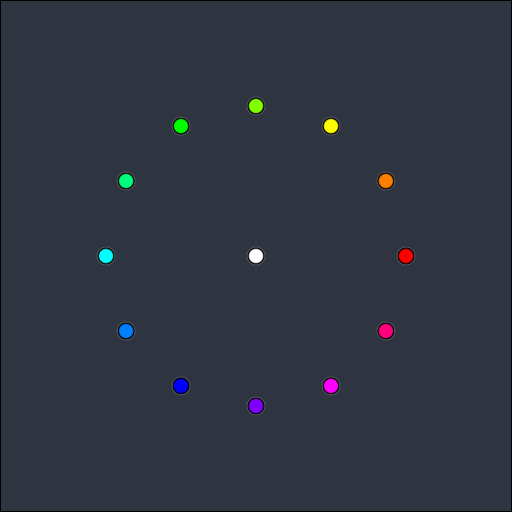
method=instanced | symbol=disc | size=16px | clamp=off | scaling=fixed | lighting=off
from itertools import cycle

from vispy import scene, use
from vispy.visuals.markers import symbol_shaders

use(gl="gl+")


marker_sizes = cycle([16, 32, 64, 96, 128, 256, 512])
scaling_modes = cycle(["fixed", "scene"])
marker_symbols = cycle(symbol_shaders.keys())


class Canvas(scene.SceneCanvas):
    def __init__(self):
        scene.SceneCanvas.__init__(
            self, keys="interactive", size=(512, 512), title="Instanced Markers Demo"
        )
        self.unfreeze()
        self.view = self.central_widget.add_view()
        self.view.camera = scene.PanZoomCamera(rect=(0, 0, 512, 512), aspect=1.0)

        self.marker_positions, self.face_colors = _create_markers_pattern()
        self.method = "instanced"
        self.current_size = next(marker_sizes)
        self.current_symbol = next(marker_symbols)
        self.clamping_enabled = False
        self.scaling_mode = next(scaling_modes)
        self.spherical_enabled = False
        self.markers = scene.visuals.Markers(
            method=self.method,
            parent=self.view.scene,
            scaling=self.scaling_mode,
            spherical=self.spherical_enabled,
        )

        self.freeze()

        self.markers.set_data(
            self.marker_positions,
            face_color=self.face_colors,
            edge_color="black",
            size=self.current_size,
            edge_width=2,
            symbol=self.current_symbol,
        )

        self.view.bgcolor = "#2e3440"

        self.print_state()
        self.show()

    def print_state(self, changed=None):
        """Print current state with optional highlighting of what changed."""
        clamp_str = (
            f"{self.markers.canvas_size_limits}"
            if self.clamping_enabled
            else "off"
        )

        parts = {
            'method': f"method={self.method}",
            'symbol': f"symbol={self.current_symbol}",
            'size': f"size={self.current_size}px",
            'clamp': f"clamp={clamp_str}",
            'scaling': f"scaling={self.scaling_mode}",
            'lighting': f"lighting={'on' if self.spherical_enabled else 'off'}",
        }

        # highlight the changed part in bold
        if changed and changed in parts:
            parts[changed] = f"\033[1m{parts[changed]}\033[0m"

        state_line = " | ".join(parts.values())
        state_line = state_line.ljust(120)
        print(f"\r{state_line}", end="", flush=True)

    def on_key_press(self, event):
        if event.text == "m":
            self.method = "instanced" if self.method == "points" else "points"

            # recreate markers with new method, cannot change method on the fly
            self.markers.parent = None
            self.markers = scene.visuals.Markers(
                method=self.method, parent=self.view.scene
            )
            self.markers.set_data(
                self.marker_positions,
                face_color=self.face_colors,
                edge_color="black",
                size=self.current_size,
                edge_width=2,
                symbol=self.current_symbol,
            )
            self.markers.scaling = self.scaling_mode
            self.markers.spherical = self.spherical_enabled
            if self.clamping_enabled:
                self.markers.canvas_size_limits = (10, 100)

            self.print_state(changed='method')
            self.update()

        elif event.text == "s":
            self.current_size = next(marker_sizes)
            self.markers.set_data(
                self.marker_positions,
                face_color=self.face_colors,
                edge_color="black",
                size=self.current_size,
                edge_width=2,
                symbol=self.current_symbol,
            )
            self.print_state(changed='size')
            self.update()

        elif event.text == "c":
            self.clamping_enabled = not self.clamping_enabled
            if self.clamping_enabled:
                self.markers.canvas_size_limits = (10, 100)
            else:
                self.markers.canvas_size_limits = None
            self.print_state(changed='clamp')
            self.update()

        elif event.text == "z":
            self.scaling_mode = next(scaling_modes)
            self.markers.scaling = self.scaling_mode
            self.print_state(changed='scaling')
            self.update()

        elif event.text == "l":
            self.spherical_enabled = not self.spherical_enabled
            self.markers.spherical = self.spherical_enabled
            self.print_state(changed='lighting')
            self.update()

        elif event.text == "k":
            self.current_symbol = next(marker_symbols)
            self.markers.symbol = self.current_symbol
            self.print_state(changed='symbol')
            self.update()


def _create_markers_pattern():
    import numpy as np

    # Create positions in a circle plus one in the center
    n = 12
    angles = np.linspace(0, 2 * np.pi, n, endpoint=False)
    radius = 150
    center = np.array([256, 256])
    pos = np.column_stack(
        [center[0] + radius * np.cos(angles), center[1] + radius * np.sin(angles)]
    ).astype(np.float32)

    pos = np.vstack([pos, center])

    colors = np.zeros((n + 1, 4), dtype=np.float32)
    for i in range(n):
        hue = i / n
        h = hue * 6
        x = 1 - abs(h % 2 - 1)
        if h < 1:
            colors[i] = [1, x, 0, 1]
        elif h < 2:
            colors[i] = [x, 1, 0, 1]
        elif h < 3:
            colors[i] = [0, 1, x, 1]
        elif h < 4:
            colors[i] = [0, x, 1, 1]
        elif h < 5:
            colors[i] = [x, 0, 1, 1]
        else:
            colors[i] = [1, 0, x, 1]
    colors[-1] = [1, 1, 1, 1]

    return pos, colors


if __name__ == "__main__":
    from vispy import app
    print(__doc__)
    canvas = Canvas()
    app.run()
Total running time of the script: (0 minutes 0.685 seconds)